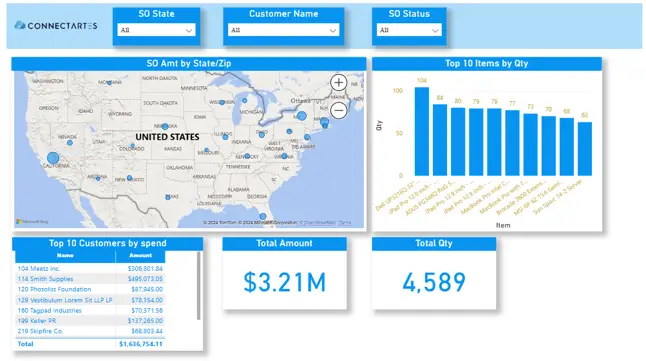
Having quick and easy access to accurate data is essential for making informed business decisions. NetSuite saved searches are a valuable tool for filtering, organizing, and reporting on data across different modules, but many businesses eventually need more than a static table of results. As reporting needs grow, teams often want dashboards that are easier to read, easier to share, and more useful for day-to-day decision-making.
That is where SearchSync helps strengthen NetSuite dashboard customization. By building on saved searches, SearchSync gives businesses a more flexible way to turn NetSuite data into dashboards, visual reports, and embedded views that are easier for different teams to use. Instead of relying on manual exports and disconnected reporting processes, organizations can create a cleaner reporting experience that supports finance, operations, sales, and leadership more effectively.
In this blog post, we will take a closer look at Dashboard Saved Searches, explain how SearchSync goes beyond standard NetSuite saved searches, and share practical ways to get more value from your reporting.
The Limitations of NetSuite’s Saved Searches
NetSuite saved searches are a staple for many users because they make it possible to filter, sort, and report on data across many parts of the system. They are useful for building tailored views of transactions, customers, inventory, and operational activity. However, saved searches also have limits when businesses want broader analytics or more visual reporting.
Some of the most common limitations include:
- Static reporting: Saved searches usually present data in a tabular format. While that can be useful, it is not always the easiest way to identify patterns, compare performance, or communicate insights quickly.
- Limited interactivity: Users can review results, but deeper analysis often requires extra steps, more manual filtering, or moving the data into another tool.
- Manual reporting effort: Even when saved searches are scheduled, businesses may still rely on manual exports or extra report preparation to make data easier to use.
- Limited presentation options: Saved searches are strong for data retrieval, but they do not always provide the level of dashboard design or visualization flexibility that users expect.
These challenges can slow down analysis and make reporting harder to scale across the organization. For many businesses, the issue is not that saved searches are ineffective. It is that they are only one part of the reporting process.
How SearchSync Enhances NetSuite Dashboard Customization
SearchSync takes the concept of saved searches further by helping businesses turn those searches into dashboards and visual reporting experiences that are easier to manage and easier to understand. The published Smartes content positions SearchSync around customizable dashboards, broader data integration, embedded visualizations, and scheduled export updates.
Here is how SearchSync improves NetSuite dashboard customization:
- Dynamic dashboards: Businesses can use saved search data in dashboards that give users clearer, more practical insight into performance.
- More interactive reporting: Instead of viewing static results alone, users can work with dashboards that make data easier to explore and review.
- Scheduled data updates: The product page describes export schedules that can run hourly, daily, or weekly, helping dashboards stay current without as much manual effort.
- Broader data visibility: SearchSync is described as supporting data from any NetSuite module or transaction, including financial and non-financial information.
- Custom visualizations: Teams can present data in formats that are easier to understand than standard tables alone.
- Embedded reporting inside NetSuite: The solution page also highlights embedding custom visualizations and reports directly into NetSuite home pages.
This matters because strong NetSuite dashboard customization should do more than display data. It should help users access the right data in the right format, with less effort and better visibility across the business.
Tips and Tricks for Maximizing NetSuite Dashboard Customization with SearchSync
To get the most value from Dashboard Saved Searches and improve NetSuite dashboard customization, it helps to think beyond simply displaying data. The most useful dashboards are focused, relevant, and designed for the people who actually use them.
Build dashboards for specific business needs
One of the biggest advantages of SearchSync is the ability to support multiple dashboards for different audiences. Instead of trying to force every department into one view, businesses can create dashboards tailored to different roles and priorities.
For example:
- Finance dashboard for revenue, margin, and receivables
- Sales dashboard for customer activity and pipeline-related trends
- Operations dashboard for fulfillment, inventory, or workflow visibility
- Leadership dashboard for high-level KPIs and summary trends
This approach makes NetSuite dashboard customization more useful because each team sees the information that matters most to them.
Use filters to keep dashboards focused
Dashboards are most effective when they show the right level of detail. Filters can help narrow the view to a specific quarter, location, product line, department, or reporting segment.
Using focused filters can help businesses:
- Highlight the most relevant metrics
- Reduce clutter on the dashboard
- Compare results more easily
- Spot trends faster
- Support more targeted decision-making
Rather than overwhelming users with too much data at once, focused dashboard views make reporting much easier to interpret.
Automate recurring dashboard updates
The current Smartes content refers to scheduled data exports and update intervals such as hourly, daily, and weekly. That makes it more accurate to describe SearchSync as supporting scheduled data refreshes rather than guaranteed real-time syncing.
This is still valuable because automated updates help businesses:
- Reduce manual report preparation
- Keep dashboards current on a defined schedule
- Improve consistency in reporting
- Make information easier to share with stakeholders
For many teams, regularly updated dashboards are enough to support timely decisions without the burden of constant manual exports.
Use visualizations to make data easier to understand
One of the clearest benefits of better NetSuite dashboard customization is improved readability. Tables are useful, but they are not always the best way to communicate performance.
Visualizations can help users:
- Compare trends over time
- See performance differences across teams or regions
- Identify changes more quickly
- Make reports easier for non-technical users to understand
Depending on the data, a bar chart, line graph, summary widget, or comparison view may communicate the message more clearly than a standard list of results.
Embed important dashboards where users already work
The Smartes content highlights the ability to embed visualizations and reports directly into NetSuite home pages. That can be especially valuable because it keeps reporting close to the daily workflow instead of making users switch to another system just to review performance.
Embedding dashboards inside NetSuite can help:
- Improve visibility of key metrics
- Encourage more consistent use of reporting
- Reduce the time it takes to find important information
- Make analytics feel like part of the operational process
Combine financial and non-financial data for a broader view
The product page describes support for data across financial and non-financial areas, including marketing campaigns, customer activities, and other NetSuite information. That means businesses can create dashboards that connect more than one side of the business.
For example, a single dashboard might combine:
- Sales performance
- Customer activity
- Campaign results
- Operational metrics
- Inventory trends
This kind of reporting gives businesses a more complete picture and makes NetSuite dashboard customization more strategic, not just more visual.
Review dashboards regularly
Dashboards should evolve as the business changes. A dashboard that worked well six months ago may no longer match current reporting priorities.
Regular review helps ensure that dashboards remain:
- Relevant to business goals
- Aligned with changing KPIs
- Focused on useful metrics
- Easy for teams to understand and use
Even strong dashboards need occasional updates to stay effective.
Turning Saved Searches into Better Dashboards
SearchSync gives businesses a stronger approach to NetSuite dashboard customization by building on the value of saved searches and turning them into more flexible, more visual, and more practical reporting tools. With customizable dashboards, embedded visualizations, broader NetSuite data coverage, and scheduled refresh options, businesses can move beyond static reporting and create dashboards that are easier to use across the organization.
For companies that want more from their NetSuite reporting, the goal is not just to display more data. It is to make data easier to access, easier to understand, and easier to act on. That is where better NetSuite dashboard customization can make a meaningful difference. If you would like to know how you can purchase this solution click here! Or contact us to learn how you can install this solution in your NetSuite environment.