Order entry is one of those processes that looks simple until you measure how much time it consumes. A customer emails an order request. Someone on your team re-keys it into NetSuite. The customer replies with a correction. A line item is missing a configuration detail. Pricing needs clarification. Then comes the final confirmation—and only after that can fulfillment and invoicing move forward. If your team lives in that loop, what you really need is a NetSuite order entry portal: a secure, guided experience that lets external users create accurate orders directly from a browser—without giving them NetSuite access or NetSuite licenses.
In this article, we’ll clarify what the Creator Page does, why it matters for operational efficiency, and how it supports an eCommerce-like ordering experience—item search, configurable options, cart management, and even payment—while keeping NetSuite as the system of record.
What Is the Online Pages Creator Page?
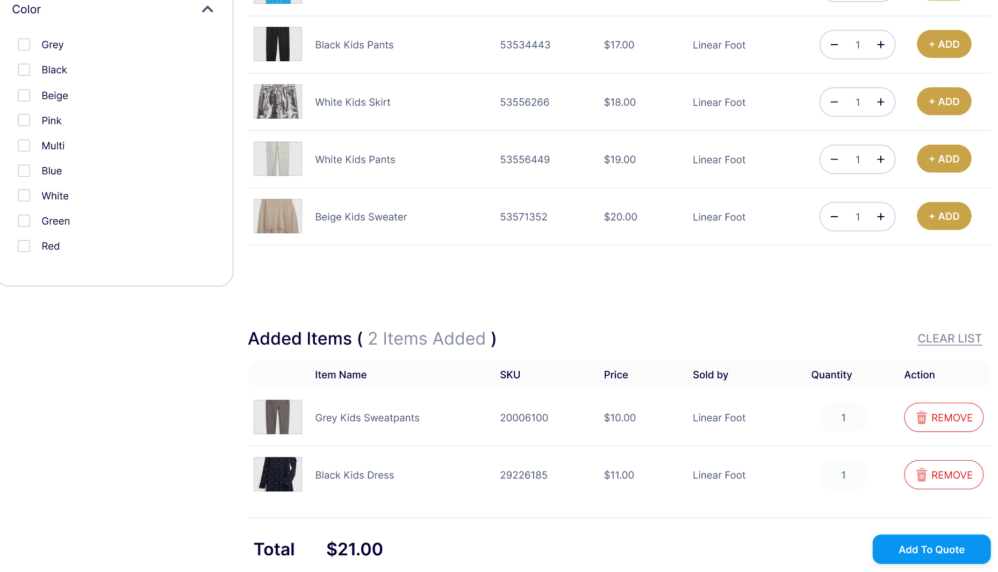
The Creator Page is a web-based ordering experience designed to function as a NetSuite order entry portal. Instead of customers sending order details through email or spreadsheets, the Creator Page gives them a structured interface where they can:
- Search and find items quickly,
- Select products and enter quantities,
- Choose item options (size, color, measurements, etc.),
- Review their cart in real time,
- Submit an order—optionally including payment via credit card or ACH.
The key concept is simple: the Creator Page helps customers provide clean, complete order information the first time, so your team doesn’t have to interpret, re-key, or chase missing details.
Why a NetSuite Order Entry Portal Matters
NetSuite is an excellent system of record—but most external users aren’t going to log into NetSuite to create transactions, and most businesses don’t want to manage license costs and training for customers, dealers, or partners. That gap is where order entry friction lives. A practical NetSuite order entry portal eliminates the back-and-forth for missing details
Many orders aren’t “wrong”—they’re incomplete. The customer forgets to include a measurement. A configurable item needs a selection. A required field is missing. Then your team becomes a human validation layer. A Creator Page can enforce structure upfront, so customers can’t move forward without the necessary details.
Customers also expect ordering to feel modern. They want search, filters, and clarity. They don’t want to scroll through long lists, decode part numbers, or wait for email responses. The Creator Page is built to make ordering intuitive, which reduces support effort while improving customer satisfaction.
Core Capabilities of the Creator Page
A strong NetSuite order entry portal isn’t just “a form.” It’s an ordering flow that helps users complete a transaction accurately and confidently. The Creator Page is designed around that goal, with capabilities that map directly to the real-world challenges of B2B order entry.
Guided order creation with an intuitive interface
The Creator Page supports a straightforward ordering experience where users can add items, remove items, adjust quantities, and review what they’ve selected. Instead of sending a list of SKUs via email and hoping it’s interpreted correctly, customers can build the order themselves in a structured layout.
This matters because order entry isn’t only about creating the transaction—it’s about reducing the “cleanup work” your team does after the transaction is created.
When users can clearly see what they’re ordering, and your process defines what information is required, the order you receive is closer to “ready for fulfillment” the moment it’s submitted.
Fast item search and filtering for large catalogs
If you have many items, manual order entry becomes painful for both your customer and your team. Customers don’t always know the exact item name, and they often need to browse.
A NetSuite order entry portal should behave like a product catalog: searchable, filterable, and easy to navigate.
With search and filtering, the Creator Page helps users quickly locate what they need without relying on internal staff to translate descriptions or send product lists back and forth. That’s especially important in B2B scenarios where customers reorder frequently but still need to find items quickly.
Configurable items that capture real ordering requirements
Many businesses don’t sell “one fixed item.” They sell variations and configurations: sizes, colors, measurements, packaging, add-ons, materials, or other selection-based inputs. When customers place orders via email, these details are often embedded in free-text notes, which creates ambiguity and cleanup work.
The Creator Page supports configurable selections so the customer can provide the necessary details in a controlled way. That reduces:
- Order clarification emails,
- Production delays from missing specs,
- Errors caused by interpretation.
In a well-designed ordering experience, configuration is not a special case—it’s a core part of the flow. A Creator Page functions best when it helps customers complete complex orders correctly without needing assistance.
Real-time cart management
Cart management is where ordering becomes practical. Customers need to see what they’ve selected, adjust quantities, remove items, and confirm the final order before submission. When ordering happens through email, cart review is usually a manual confirmation step—your team summarizes the order and asks the customer to confirm.
A cart-based Creator Page moves that confirmation step to the customer, in real time, and reduces the number of times your internal team has to “restate” the order. That single change often eliminates a surprising amount of operational overhead.
Secure checkout and payments
In many companies, order entry and payment are separate workflows. The customer submits an order, then your accounting team sends an invoice or payment link later, then the customer pays through another system. Each transition adds friction and delays cash collection.
The Creator Page can support secure payment options such as credit card and ACH, allowing you to streamline the flow from “order created” to “order paid,” where appropriate for your business model.
Even when you don’t require payment at the moment of order entry, having payment as an available step can reduce the number of “how do I pay?” follow-ups and shorten your order-to-cash cycle.
Turn Order Entry Into a Self-Service Experience
If your team spends too much time re-keying orders, clarifying missing details, or fixing preventable order entry mistakes, the underlying problem isn’t NetSuite—it’s the lack of a customer-friendly interface for submitting orders accurately.
The Online Pages Creator Page is designed to fill that gap by acting as a NetSuite order entry portal. It gives external users a structured ordering experience with item search, configurable options, cart management, and secure checkout—without requiring NetSuite access or licenses.
If you want to reduce order entry friction, improve accuracy, and speed up the order-to-cash flow, a Creator Page is a practical place to start. Want to see how Online Pages would fit your ordering process? Contact Smartes Solutions for a quick walkthrough of Online Pages and how a NetSuite order entry portal can be configured around your catalog and workflows. Contact us to learn how you can install this solution in your NetSuite environment.