For many NetSuite users, customer self-service sounds simple at first. Customers want to view orders, check invoice details, make payments, review history, or submit information without emailing your team every time they need an update.
NetSuite does offer a native option for this: the Customer Center. This solution gives customers online access to their own estimates, orders, invoices, payments, and certain support information, depending on how the account is configured. NetSuite also allows administrators to enable customer access and assign the Customer Center role from the customer record.
But while Customer Center provides access, many businesses need more than access. They need a better customer experience. That is where Smartes Online Pages becomes a stronger fit. Online Pages gives customers, vendors, dealers, and other external users a modern way to interact with NetSuite data through secure, easy-to-use online pages. Instead of forcing users into a standard NetSuite login experience, Online Pages creates a cleaner, more flexible interface where customers can view information, take action, and stay connected to live NetSuite records.
What Is the NetSuite Customer Center?
NetSuite Customer Center is a standard NetSuite role designed to give customers access to selected information inside NetSuite. With Customer Center, customers can log in and view records such as estimates, sales orders, invoices, payments, cases, and related account details.
For companies that only need basic customer access, this may sound like enough. A customer can log in, review their information, and complete certain actions if the right permissions are enabled.
The challenge is that Customer Center still feels like a NetSuite-centered experience. Customers need access, credentials, and a role. The business needs to think through permissions, available records, visibility, and the way customers move through the portal. While Customer Center can expose useful information, the experience may not feel as simple, branded, or guided as many customers expect from a modern online portal. In other words, Customer Center solves part of the problem: giving customers access.
What Is Smartes Online Pages?
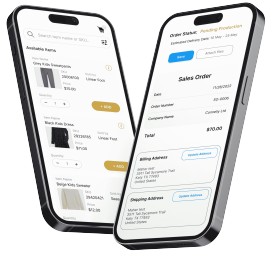
Smartes Online Pages is a NetSuite customer portal solution designed to make NetSuite data easier for external users to access and act on.
Online Pages turns NetSuite records and transactions into secure, interactive online pages. These pages can be shared with customers through a link, email, SMS, or QR code. From there, users can view live details, submit updates, approve or reject requests, upload documents, make secure payments, or confirm information.
The important difference is that the user experience is built around the customer’s task, not around NetSuite’s native interface.
A customer does not need to understand NetSuite. They do not need to navigate through a complicated backend-style portal. They simply access a page that shows the information they need and the action they need to complete.
Smartes Online Pages is highly configurable and can closely meet your business requirements, there are tons of features to choose from! The following is just a sample:
- Order Status Tracking
- Order Entry
- File Sharing
- Reordering
- Transaction History
- Share Files (e.g. Proof of Delivery, Packing Slips, Invoices, etc)
- Receive Files
- Customer Approvals
- Take Payments Online
The Core Difference: Native Customer Access vs. A Better Customer Experience
The biggest difference between Customer Center and Online Pages is not simply what customers can access. It is how they access it. Customer Center is the native NetSuite option. It gives customers a login-based way to view and interact with certain NetSuite records. That can be helpful, but it still carries the structure and limitations of a standard NetSuite portal.
One limitation is the login experience. If a customer only needs to pay an invoice or check an order, asking them to remember a username and password can create unnecessary friction.
Another limitation is the interface. Customer Center is still based on NetSuite’s native portal structure. For many businesses, that is not the experience they want to put in front of customers. Customers are used to clean, simple, mobile-friendly portals that show exactly what they need without extra steps.
Customer Center can also feel restrictive when the workflow becomes more specific. For example, your business may want customers to approve an order, upload documents, confirm shipping details, reorder items, or interact with a custom transaction process. In those cases, you need more than standard access. You need a flexible front-end experience connected to NetSuite.
Online Pages is different. It gives customers access to the information and functionality they need, but through a more UI-friendly page that is easier to understand, easier to use, and easier to share.
Why Online Pages Is the Better Fit
Online Pages gives businesses the ability to provide customer-facing NetSuite access in a way that feels modern, simple, and purpose-built.
Customers can access pages from a secure link instead of being forced through a traditional login flow. They can view live NetSuite information from a page designed around their specific need. They can take action from the same place, whether that means paying an invoice, confirming an order, submitting information, or reviewing history.
For internal teams, this helps reduce manual work. Customer service teams receive fewer basic status questions. Accounting teams can make invoice payment easier. Sales and operations teams can collect confirmations, updates, or approvals without relying on disconnected emails.
Online Pages also supports more than just customers. The same concept can be used for vendors, dealers, partners, sales reps, or other external users who need controlled access to NetSuite information without direct NetSuite access.
That flexibility is what makes Online Pages more than a replacement for Customer Center. It becomes a better way to extend NetSuite to the people who need to interact with it.
A Note on Security and Payments
Security is an important consideration for any customer-facing NetSuite portal. Online Pages is designed to provide secure access while keeping the customer experience simple.
When a customer accesses Online Pages, they are not simply opening a public page. The user must enter the email address associated with their account. Once the email is entered, the user receives a verification email with a magic link. After clicking that link, the user can securely access the Online Page.
For payments, Online Pages does not expose sensitive payment details such as full credit card or ACH information. Payment processing is handled securely through Braintree, so customers can make payments through the portal without Online Pages displaying or storing sensitive payment information.
Online Pages is built to follow the same access logic and customer data controls as the company’s NetSuite environment. Customers only see the information they are allowed to access, such as order history, order details, invoices, payment status, or other approved transaction information.
Conclusion: Customer Center Gives Access. Online Pages Creates the Better Experience.
NetSuite Customer Center can give customers access to records like orders, invoices, payments, and account information. But for many businesses, the real goal is not just access. The goal is to give customers a better way to interact with NetSuite.
Smartes Online Pages provides that better experience. It gives customers a cleaner, more flexible, and more user-friendly way to view orders, pay invoices, confirm information, submit updates, and interact with live NetSuite data. It reduces friction for customers and manual work for internal teams.
If your business wants a more modern alternative to NetSuite Customer Center, Online Pages gives you the ability to turn NetSuite records into secure, interactive pages that customers can actually use.
Ready to give your customers a better NetSuite portal experience? Click here! Contact us to learn how you can install this solution in your NetSuite environment.